OpenBSD Serial Console
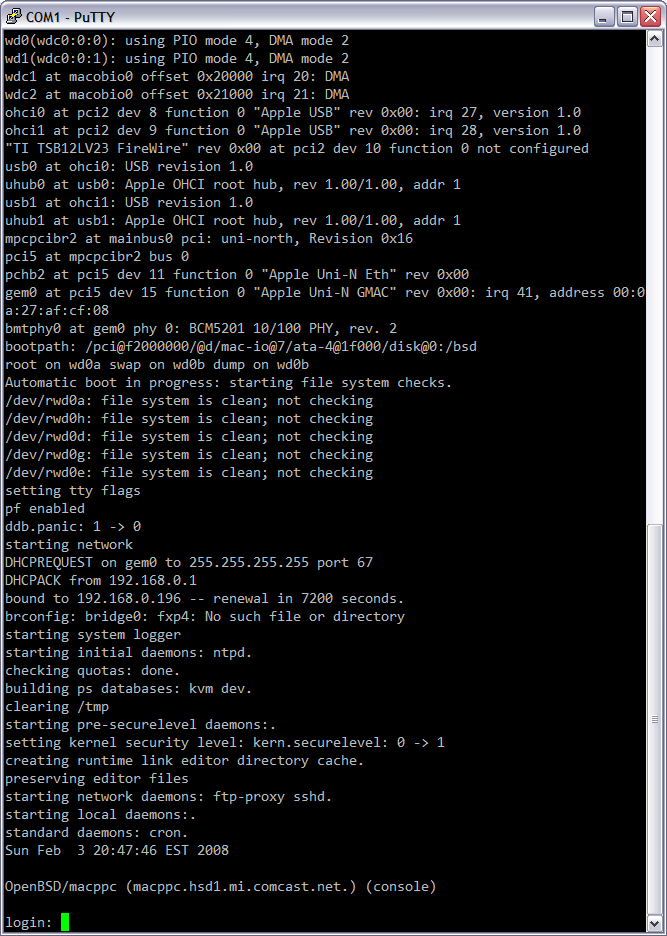
Serial consoles are cool, and OpenBSD on a machine with Open Firmware makes it easy.
First, I came across these directions for making Mac to PC (MiniDIN 8 to DB9) null modem cables and made one out of a spare connector from the Honda Music Link work, some CAT5, a new female DB9, and a old DB9 shell.
After hooking this up and starting PuTTY as VT220 on COM1 at 57600 I booted into OF and ran the following commands:
setenv input-device scca
setenv output-device scca
reset-all
After this the box rebooted, the monitor stayed blank, and the OpenBSD bootloader showed up on the serial terminal. One of the many nice things about OpenBSD macppc is that it’s bootloader and kernel boot messages automatically go to the output to the OF console. All I had to do was ensure that this line was in /etc/ttys and the first serial port becomes a real console:
console "/usr/libexec/getty std.57600" vt220 on secure # for serial
Oh, and in case you’re wondering how I got a serial port on the G4 AGP I’ve been fooling with: I picked up an old Griffin G4Port on eBay. This is a drop-in replacement for the modem which provides an old MiniDIN 8 Apple-type serial port on the back panel.
I’m going to write up a lot more about this box on my main site after it’s up and running.
I’m going to write up a lot more about this box on my main site after it’s up and running.
I’m looking forward to it, actually. I haven’t had “real” networking iron ever since I sold off my Sun lunchbox collection. I’ve been getting by with a Linksys WRT54G, but it just doesn’t cut it anymore. I have to plug the rest of my network through the VoIP adapter in order for that to work, but the VoIP in turn blocks IM video and other ports and just causes headaches.
I’ve had a G4 AGP as an OSX RAID server for a while now, and I’ve found both copper gigabit ethernet and quad-port 10/100 PCI-X cards at RE·PC. I’ll either upgrade the G4, or buy a G3 tower. Still debating that one.
I also found that while the one store has all of the gigabit fiber cards, the other store has all of the fiber cables. Aside from cool factor, I’m trying to find a way to justify it.
I hope I don’t disappoint, but it’s mostly just going to be a how-to. Config files, bridging info, parts added, photos, things like that.
To be honest, it’s really nifty to see how much like a real unix box a Mac can be with the right software. Also, dropping that video card took it from 44 watts down to 36-38 watts. I’m not sure what the quad port NIC will at, but I figure it can’t be more than another 10W.
Which NICs is it you are thinking of getting?
Wow, I just saw this at their store and was thinking about the old PS2 Model 60s at that school my dad worked at… Wow, that was a while ago. Hrm. I’ve still got the motherboard from one of those.
Fiber… You can… Buy a polishing kit and learn to terminate fiber at $5/throw?
That’s the kind of info I need. I used to have various boxes set up to do various things with various operating systems (NetBSD/sparc for local DNS, OpenBSD/sparc for RAID, another SPARC box for tape backup, etc.), but I never played around with pf. And for a firewall/router type box, I’d really only use OpenBSD. I’m also really interested in what to look for when booting from flash, and curious if you found any use for the cryptographic accelerator.
I’ve “pre-fetched” most of the hardware. The copper GigE card is an Intel PRO/1000 MT for $10, and the quad 10/100 cards are apparently Osicom 2404-TX cards for $17/each.
And I actually stumbled across a PS/2 Model 80 386 in their as-is section and though of those days too :)
I just got started this morning while on a conference call. What I’ve got thus far (not much, really) is here: Trashwall
What chipset is on the four-port NICs? I’m having a hard time finding out, and I’m curious which driver it works on…
I haven’t really bothered much with the crypto card, mostly because in the past I’d found that for most things it doesn’t help. I’d want AES support on it anyway, which it’s old enough not to have. Soekris makes a PCI one which does do AES, but at $70-some, I think that’s a bit beyond the trashwall’s budget. Not to mention that I don’t have any PCI slots left…
I’ll get some openssl speed tests up later. :)
Hi!
Do you know, are any device like this but for PowerBooks are avaliable?
Thanx.
Sorry, I don’t… For Apple laptops I tend to just use a serial to USB adapter.