nuxx-spoiler: The WordPress Plugin
The idea of spoilers, and trying to avoid them, for everything from fiction to time-delayed sports matches, is nothing new. Discord and Reddit have special features allowing text and images to be hidden with a spoiler tag so users must click to show the content. I’m planning a post about the things I learned while healing my scraped leg (resulting from pushing a worn out bike tire too hard), and I realized that it’d be good to both show pictures of the wound and healing progress and that a spoiler-like tag would be useful for obscuring some of the images.
After looking around for a WordPress Plugin I couldn’t find any good options for this. There’s some old and abandoned plugins, there are others which obscure text, some parts of larger plugins, but no stand-alone “spoiler” plugin. Knowing what I wanted I fired up my currently-preferred AI coding assistant (Claude) and got it working on what I wanted.
After a day or so of back-and-forth, this is what I came up with: c0nsumer/nuxx-spoiler
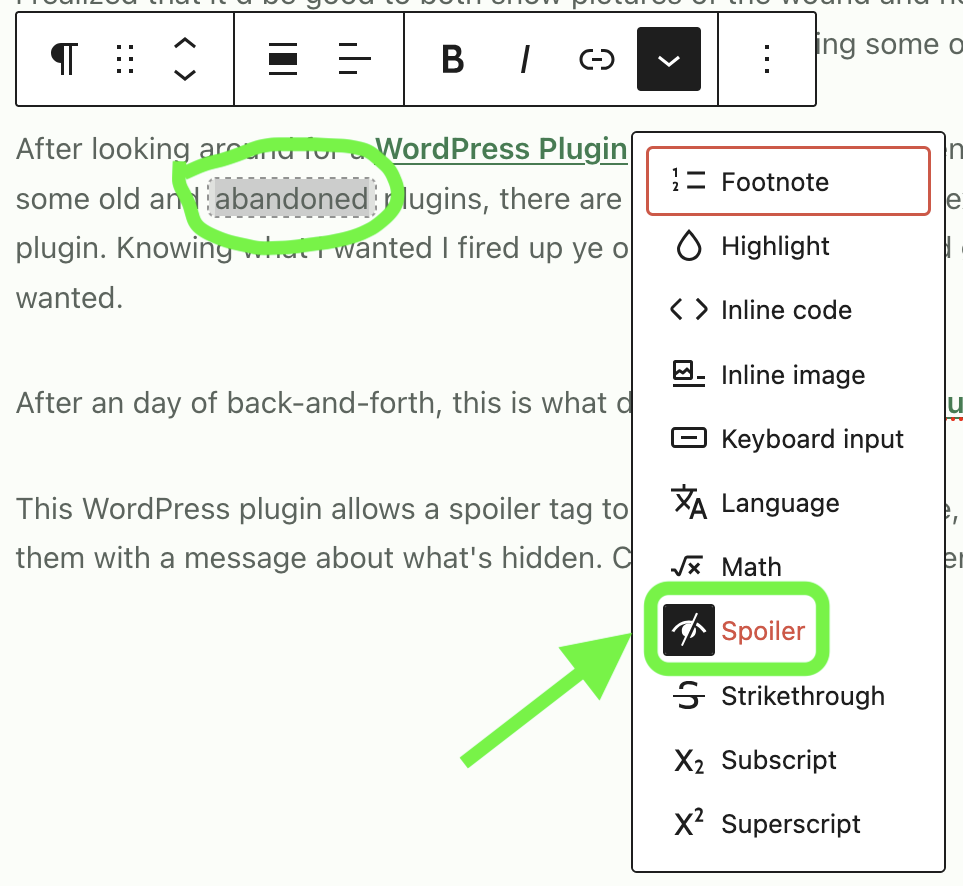
This WordPress plugin allows a spoiler tag to be added to any image, text, or group of blocks, hiding the content with a configurable warning about what it contains. Clicking the warning or overlay then shows what’s behind it; very very similar to Discord’s Spoiler Tags. Below the fold I’ve a number of examples (this also serves as a test post) showing hidden text, hidden individual images, hidden blocks (such as a gallery of images) with the spoiler type (configurable or canned) listed over images. And it’s all nicely integrated with the WordPress editor (as compared to some older schemes that required using code for tagging.)
I’m considering if I’ll submit this to the standard WordPress Plugin repository, but for now I think that keeping it over in GitHub and used here will be easier/best. This way others can grab and use it if they want, but I don’t need to deal with the overhead of supporting a plugin that I don’t have a deep care for about and put minimal (AI) effort into. (If I do this I’ll need a better name, slug, etc as well. I don’t really like the nuxx-spoiler name, but it meets the needs.)
Inline Images and Text
Lorem ipsum dolor sit amet, consectetur adipiscing elit. Sed rhoncus mi sed auctor varius. Vestibulum arcu nisi, congue quis euismod at, consequat eu nisi. Sed molestie eu nisi vulputate bibendum. Mauris et est sit amet quam condimentum lobortis sit amet sit amet dui. Vivamus et dui id nibh facilisis consequat. Vivamus malesuada, ligula ac tempor feugiat, nibh dui laoreet massa, ut vehicula orci elit a mauris. Quisque aliquam est mauris, vel tristique nisl molestie sed.
It’s a good thing we can hide text alone, since some phrases need to be blocked out by default.
Nam varius nunc vel enim porta maximus. Etiam rutrum arcu non dictum iaculis. Fusce at nibh orci. Proin pharetra lectus vitae lorem mollis iaculis. Nunc vel maximus nulla. Nunc fermentum quam luctus cursus pellentesque. Pellentesque lacus est, fermentum quis libero quis, tincidunt dignissim purus. Etiam id congue eros, id faucibus leo. Mauris tincidunt auctor orci, at rutrum urna. Integer imperdiet auctor odio, vel viverra metus. Nulla molestie, nisi in hendrerit sollicitudin, mauris mauris porta eros, vel porttitor odio lectus in ex. Donec maximus tortor eu pellentesque ornare.
Text Block
Individual Images in a Gallery